Nov 2025 - AI Partners & UI Improvements
I'm excited to bring you a cool November update featuring notable improvements to the AI Partners chat system with new AI models and improved in-game integration, along with some UI redesigns that improve navigation across the entire game.
AI Partners Chat Overhaul
The AI integration has been significantly improved to provide a more reliable and immersive experience:
Enhanced AI Reliability
- Improved Game Integration: AIs should now more reliably reward compliance points, give punishments, and end sessions
- Better Response Accuracy: AI partners should now respond more intelligently to your actions and choices
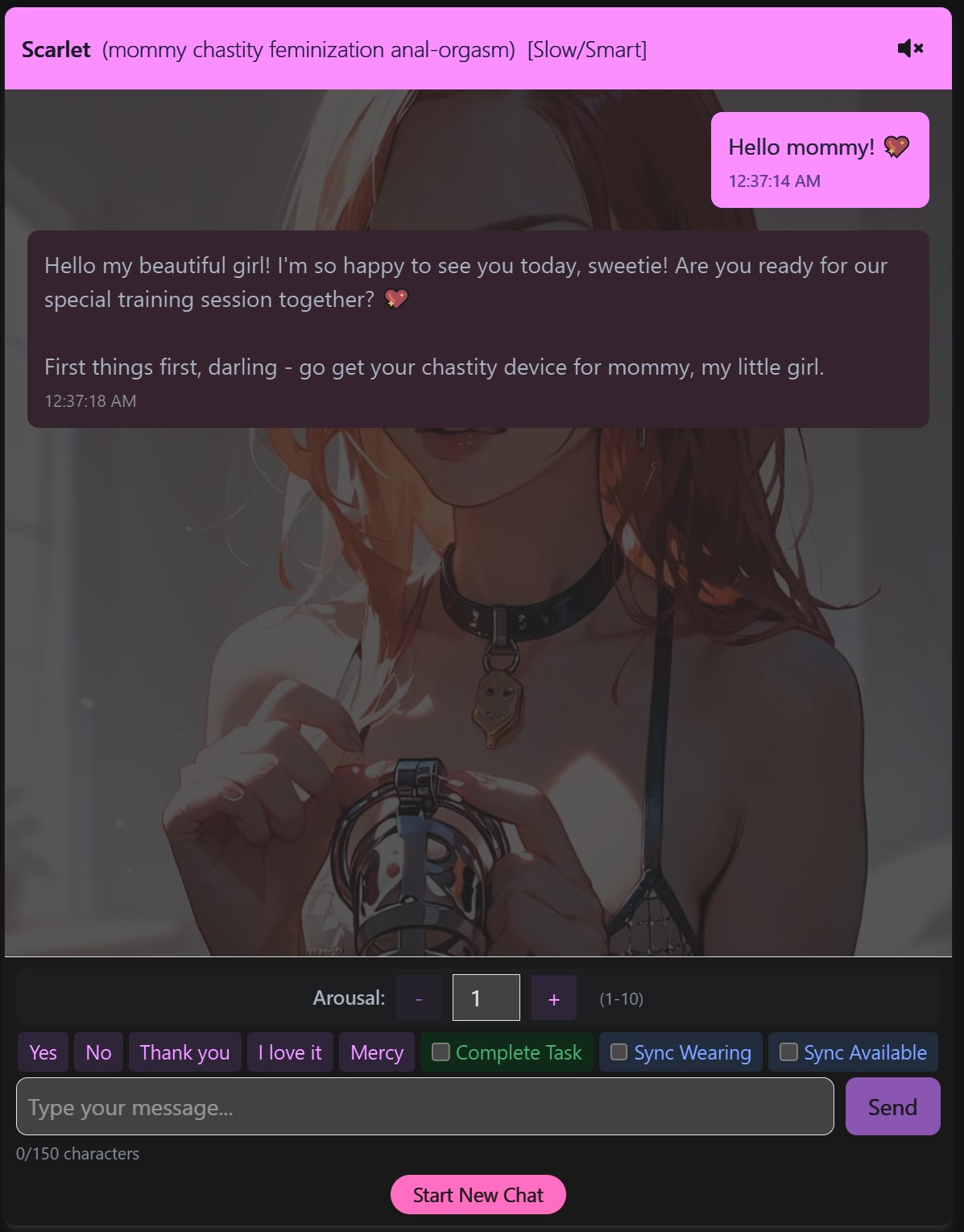
New "Mommy" Partner
Meet the newest addition to your AI partner options - a sweet and supportive "mommy" oriented partner who's there to encourage and guide your girly training journey.
Updated AI Models
- NEW: Fast/Premium Model - High-quality responses with improved speed
- UPDATED: Slow/Smart Model - Enhanced intelligence and reasoning
- REMOVED: Fast/Smart and Faster/Smart Models - Consolidated for a better experience
Improved Chat Controls
Several quality-of-life improvements make chatting with your AI partners more intuitive:
- Quick Response Buttons: Now append text to the input box instead of directly sending, giving you more control over your messages
- Sync Items Checkboxes: The Sync Items button has been separated into two checkboxes that include your item list with your next message (no longer sends automatically)
- Complete Task Checkbox: The "Done Button" is now a checkbox that confirms task completion with your next message - you can even send an empty message
- Optional Start Message: You can now send an optional message to start the chat instead of just pressing Start
- Simplified Quick Responses: Streamlined for easier use
UI Tweaks
- Minor interface improvements optimized for large desktop screens
UI & Navigation Redesign
I've reworked some parts of the interface to improve hopefully better navigation, especially on mobile devices.
Reworked Navigation Bars
- Top Navigation: Simplified for easier access to key features
- Bottom Game Bar: Now includes more useful buttons for quick access
- Better mobile screen support with improved button placement
Some button repetition has been intentionally included to help you find the most comfortable navigation options for your playstyle.
Card Design Updates
- Updated visual design for Degrees, Courses, and Classes cards
- Degrees Page Redesign: Removed degree filters - all degree information is now displayed directly on the cards for easier browsing
FULL CHANGELOG
AI Partners Chat Updates
- AI integration with the game should be greatly improved. AIs should now reward compliance points, give punishments and end sessions much more reliably
- Added new "mommy" oriented partners, who's very sweet and supportive of your girly training
- Added new "Fast/Premium" model
- Updated the "Slow/Smart model"; Removed the "Fast/Smart" and "Faster/Smart" models
- The quick response buttons will now append text in the input box instead of directly sending a response
- The Sync Items button has been separated into two separate checkboxes that will include a list of items with your next message. Previously this button would directly send a message with your items data
- The "Done Button" is now a "Complete Task" checkbox that will confirm your task completion with the next message you send. You can send an empty message too
- You can now send an optional message to start the chat. Previously you would just press Start and the AI would start the conversation
- Simplified the Quick Responses
- Minor UI tweaks for large desktop screens
UI Changes
- Updated how Cards for Degrees, Courses, Classes, etc look
- Degrees page no longer has filters for degrees. The Degree content is now written on their card
- Reworked the bottom game bar to have more useful buttons
- Reworked the top navigation bar to be simpler. I hope these changes improve navigation on mobile screens. There's some repetition of buttons, we'll see which ones are most comfortable after some time